


Most QC inspectors still check AQL tables on paper or in a PDF before every inspection. It is slow, and it is easy to read the wrong row, especially when the table shows an arrow instead of numbers.
The apparelscience.com AQL Sampling Calculator does this in seconds. Enter the lot size, and it shows how many pieces to inspect and the accept and reject numbers for critical, major and minor defects. It is based on ISO 2859-1 / ANSI Z1.4 and works on any phone, tablet or computer. Use it for garments, textiles, footwear, accessories or any product inspected in lots.
What it does
- Sample size and accept/reject numbers based on ISO 2859-1 / ANSI Z1.4, single sampling, normal inspection
- All seven inspection levels: General I, II and III, and Special S-1 to S-4. General Level II is the default.
- Separate AQLs for critical, major and minor defects. Critical can be set to 0 (none), and minor can be set to N/A.
- Small lots handled correctly. When a defect class needs a different number of pieces, the app tells you, so you never check the wrong quantity.
- Works offline once installed on your phone, so it is ready on the factory floor even without internet
- Remembers your settings for the next inspection, and switches to dark mode if your phone is set to it
How to use it
- Enter the lot size, the total number of pieces in the lot, in the green box at the top.
- Check the inspection level and AQLs. The defaults are General Level II, Critical 0, Major 2.5 and Minor 4.0. Change them to match your buyer’s requirements. The app remembers them for next time.
- Read the result. The green panel shows how many pieces to inspect and the code letter. Below it, each defect class shows its accept and reject numbers. If the defects found reach the reject number, the lot fails for that class.
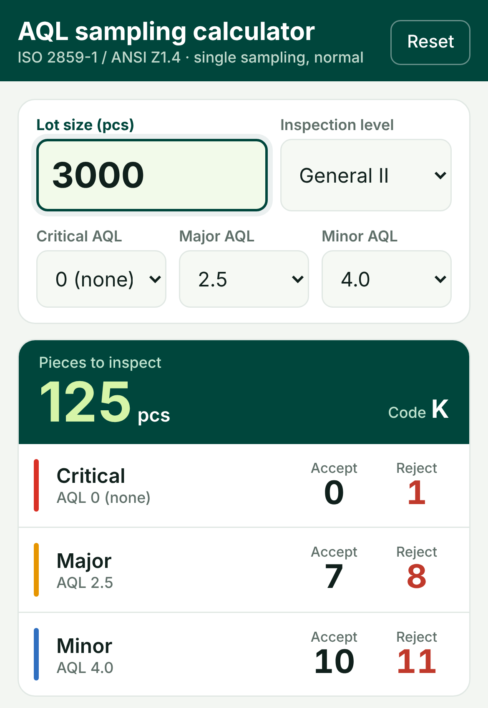
Lot of 3,000 pcs at General Level II: inspect 125 pcs. Major accept 7, reject 8.
efects are checked on the first 13 pcs.
Install it on your phone
You do not need an app store. Install it straight from the website in under a minute.
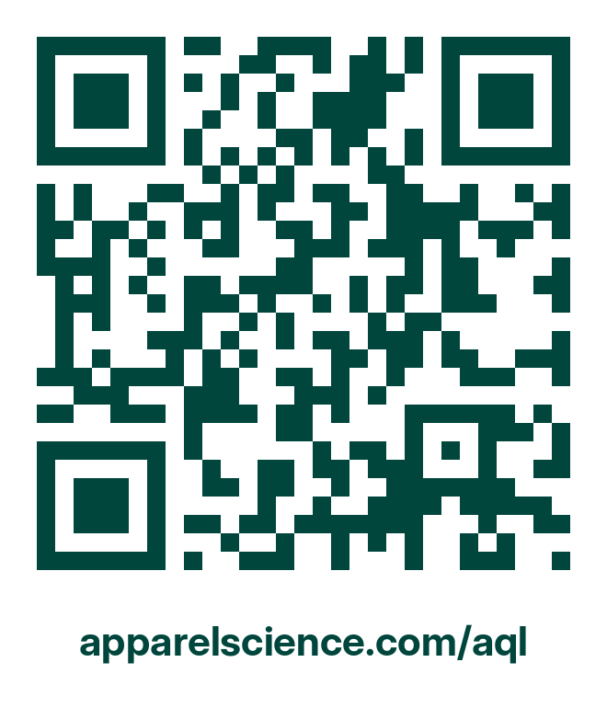
Reading this on a computer? Scan the QR code with your phone’s camera, or type apparelscience.com/aql in your phone’s browser. Then follow the steps below.
iPhone (Safari)
- Tap here to open the AQL Calculator in Safari.
- Tap the Share button (the square with an arrow pointing up).
- Scroll down and tap Add to Home Screen, then Add.
Android (Chrome)
- Tap here to open the AQL Calculator in Chrome.
- Tap the Install button at the top of the app. If you do not see it, open the Chrome menu (three dots) and tap Install app or Add to Home screen.
- Tap Install to confirm.
The AQL Calc icon now appears on your home screen. It opens full screen like any other app and works without internet after the first open. When we improve the app, your phone gets the update automatically the next time you open it online.
Two settings to know
Critical “0 (none)” means no critical defect is allowed: one critical defect fails the lot.
Minor “N/A” is for audits where minor defects are recorded but do not decide the result.
Always follow the inspection level and AQLs in your buyer’s QA manual.
Good to know
- The calculator covers single sampling under normal inspection. It does not cover double sampling, or tightened and reduced inspection under the switching rules.
- Results are for guidance. Your buyer’s QA manual and inspection protocol always take priority.
- Privacy: the app does not ask for or store any personal data. Your settings are saved only on your own device.
Try it and share it with your team
If it helps your inspections, share it with your QC team and suppliers. Have a suggestion or a feature you would like to see, such as double sampling or tightened inspection? Leave a comment below. For more practical quality guides and tools, explore the rest of apparelscience.com.